
AI PC in Dubai & UAE: How to Choose the Right AI Computer in 2026
16 September 2026 · Ahmad Nedam

Walk through any electronics shop in Dubai right now and count the badges. AI PC. Copilot+ PC. NPU. Ryzen AI. Intel Core Ultra. Snapdragon X. Six laptops on a shelf, six different ways of saying the same vague thing.
The badges are not lies. They just answer a question almost nobody is asking. Because the useful question was never which laptop has the most AI. It is this:
What kind of computer actually fits the way I work, study, create, develop or play?
That distinction matters more in the UAE than most places. A student writing essays in Al Barsha, a developer running models locally in Dubai Internet City, a designer colour-grading in a JLT studio and a gamer in Sharjah can all be sold the same "AI laptop" - and for three of them it would be the wrong machine.
This guide explains what an AI PC really is, what the NPU actually does, when it matters, how much RAM and storage to buy, and what to check before you pay for one in the UAE.
What Is an AI PC, in One Paragraph?
Short answer: an AI PC is a computer built with hardware that runs certain AI tasks efficiently, usually including an NPU alongside the CPU and GPU. It is worth paying for if you use AI-assisted software, on-device AI features, or want better battery life while those features run. It matters far less if your day is Office, email and a browser - in which case RAM, SSD speed and battery will affect you more than any AI badge.
That is the whole thing. Everything below is detail.
CPU, GPU, NPU: What Each One Actually Does
A modern computer splits work between three processors, and knowing which does what is most of the battle.
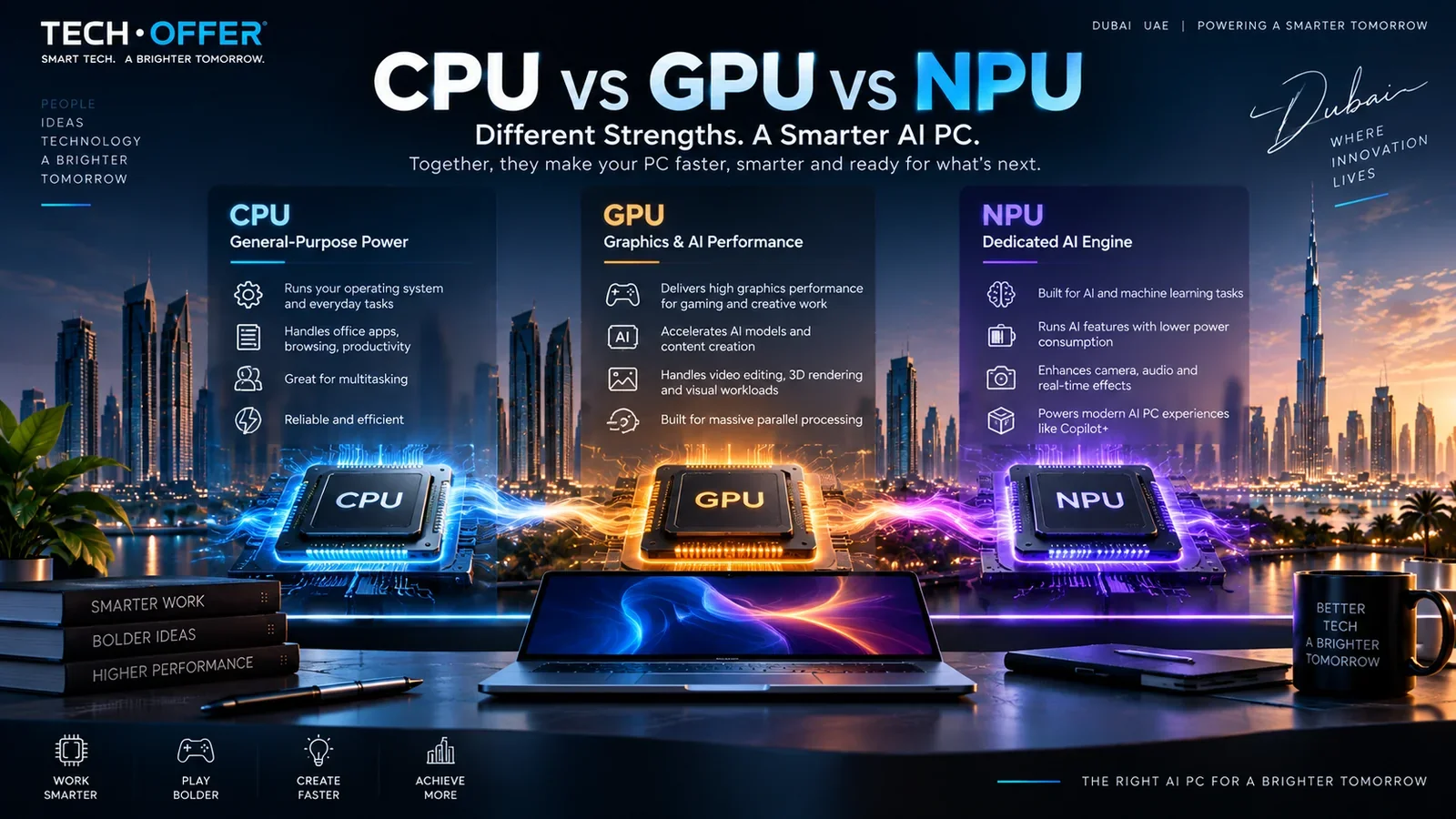
The CPU is the generalist. It runs Windows, your Office applications, your browser and most of what you do in a day.
The GPU handles massively parallel work - graphics, 3D, video rendering, and the heavier end of AI. If you want to run AI models on your own machine, this is the part that decides whether you can.
The NPU is the newcomer, and the reason the phrase "AI PC" exists at all. It is built for specific neural-network tasks and its advantage is efficiency, not raw power. Background blur on a Teams call, live captions, camera and microphone clean-up, some translation and transcription, certain Windows AI features - these can run on the NPU while drawing far less battery than pushing them through the CPU.
Here is the part the marketing skips: an AI PC does not run every AI task on the NPU. Some AI work belongs on the CPU. The demanding work belongs on the GPU. The NPU handles a specific, growing, but still limited set of jobs.
So when you see the badge, do not stop there. Read the whole specification.
What Does TOPS Actually Mean, and Should You Care?
TOPS - trillions of operations per second - is the number manufacturers print next to the NPU. Microsoft defines a Copilot+ PC as a Windows 11 machine built around an NPU of 40 TOPS or more, with certain Copilot+ features designed to run on that hardware.
It is a real number. It is also a narrow one. A higher TOPS figure tells you nothing about how the laptop handles video editing, gaming, CAD or compiling code. A machine with an impressive NPU and 8GB of RAM will frustrate you daily, and no amount of TOPS will fix it.
Buy on TOPS alone and you will overpay for a number you never use.
Do You Actually Need an AI PC?
This is the question worth sitting with, because the honest answer for a lot of buyers is "not especially".
An AI PC is worth prioritising if you:
- use AI-assisted applications regularly, not occasionally
- want on-device AI features that work without sending data to a server
- run software that specifically supports NPU acceleration
- spend long days on video calls and want the battery back
- plan to keep this machine for four or five years
It is not worth prioritising if you:
- mainly live in Office, email and a browser
- depend on older specialist software or specific peripherals
- need maximum graphics performance above everything else
- already own a computer that handles your work comfortably
AI capability is a feature of the computer. It is not a substitute for the rest of it.
Which AI PC Fits Your Work?
Rather than a "best laptop for X" list, start from the work itself. This is the table to photograph.

| What you mainly do | What should decide your purchase |
|---|---|
| Office and business | CPU, 16GB+ RAM, SSD, battery, security features |
| University and study | Weight, battery, 16GB RAM, screen quality, price |
| Programming | CPU, RAM, SSD speed, software compatibility, external display support |
| Engineering and CAD | CPU, RAM, GPU, sustained cooling, certified software support |
| Graphic design | Display quality and colour accuracy, RAM, CPU/GPU |
| Video editing | CPU, dedicated GPU, RAM, fast large SSD, cooling |
| Running AI models locally | GPU and VRAM first, then RAM and cooling |
| Gaming | GPU, VRAM, CPU, cooling, screen refresh rate |
| IT and cybersecurity | CPU, RAM, virtualisation support, ports, networking |
| General home use | CPU, RAM, SSD, battery and overall value |
This is why two people can look at the same laptop and reach opposite conclusions, and both be right.
For students
Portability and battery usually beat raw power. For most degrees, 16GB of RAM, a 512GB SSD, a current-generation processor and a full day of battery is the sensible shape.
The exception is the degree, not the student. Architecture, engineering, 3D and media production change the answer completely and often need a dedicated GPU. The word "student" tells you nothing. The software they have been told to install tells you everything.
For business and office work
Ignore "future-proof" as a sales argument. Start with 16GB of RAM, a 512GB SSD or larger, a comfortable keyboard, a webcam and microphone you are not embarrassed by, reliable Wi-Fi and the Windows edition your organisation actually requires.
For company machines, compatibility beats novelty every time. Before buying, check the laptop works with your VPN, your security tooling, your printers and any older business software you depend on. A brilliant machine that cannot join your network is not a brilliant machine.
For programming and development
Look past the NPU. What usually matters is CPU performance, RAM capacity, SSD speed, virtualisation, container and VM behaviour, Linux compatibility and how many external monitors you can drive.
If you work with local machine-learning models, the GPU and its VRAM matter far more than the NPU figure. For ordinary web development, another 16GB of RAM will change your day more than a higher-tier AI processor will.
For graphic design
In Photoshop and Illustrator, the screen is the tool. Colour accuracy, brightness and resolution affect your work every hour; a small NPU difference affects it almost never. If you work at a desk, a properly calibrated external monitor is usually a better investment than the next processor tier up.
For video editing
Premiere Pro and DaVinci Resolve lean on the CPU and GPU together. Prioritise a dedicated GPU with real VRAM, plenty of RAM, a large fast SSD and - the one people forget - cooling that holds up over a long export rather than collapsing after four minutes.
An NPU helps with supported AI features. It does not replace a graphics card when the job needs GPU acceleration.
For gaming
Here the AI badge is at its least useful. A gaming laptop may well have an NPU, but nobody buys it for that. The questions that matter are which GPU, how much VRAM, what power the GPU is actually allowed to draw, which CPU, how good the cooling is, and what the screen's resolution and refresh rate are.
We cover all of that properly in our gaming laptop buying guide for the UAE, and you can browse current gaming laptops to compare configurations. If gaming is your main reason for buying, use that guide and treat AI capability as a footnote.
NPU vs GPU: Which Matters More for AI?
They solve different problems, so the honest answer is "it depends on which AI you mean".
| Choose based on the NPU when you want | Choose based on the GPU when you want |
|---|---|
| Efficient, always-on AI features | To run AI models locally |
| Long battery life during AI tasks | Machine learning and training work |
| Windows and Copilot+ AI experiences | Image and video generation |
| Camera, microphone and live effects | 3D rendering and heavy creative applications |
| Transcription, captions, translation | Gaming and GPU-accelerated editing |
If someone tells you they want an AI laptop because they want to run AI models locally, the right follow-up is: which model, and how big is it? That answer usually points towards VRAM, not TOPS - and often towards a desktop.
How Much RAM Does an AI Laptop Need?
RAM is the specification people regret most, because it is the one you often cannot change later.
| Memory | Honest assessment |
|---|---|
| 8GB | Light use only. In 2026 this is a compromise, not a saving. |
| 16GB | The sensible starting point for most people - study, Office, browsing, general development, everyday multitasking. |
| 32GB | Worth it for virtual machines, large projects, video editing, heavy multitasking and some local AI work. |
| 64GB+ | Specialist workloads. Most buyers never need it. |
Buy memory for what you will actually run, not for the badge on the lid. And check before you buy whether the memory is replaceable or soldered to the board - on thin machines it is increasingly soldered, which makes the decision permanent. Where a machine does allow it, a RAM upgrade is usually the cheapest meaningful improvement you can make.
How Much Storage Should an AI Laptop Have?
512GB is a workable floor. Move to 1TB or more if you keep video footage, large project files, games, development environments, virtual machines, datasets or local AI models - the last of those eats space faster than people expect.
The better question is not how much storage it has today, but can I add more later. A machine with a spare M.2 slot ages very differently from one without. Current SSD options are worth checking against your model before you commit to the smaller configuration to save a few hundred dirhams.
Local AI or Cloud AI: What Is the Difference?
| Cloud AI | Local AI | |
|---|---|---|
| Where it runs | On a remote server | On your own machine |
| Strength | Access to very large models | Works without a connection, lower latency |
| Your data | Leaves your device | Stays on your device |
| Hardware cost | Low - the server does the work | High - you need the VRAM and RAM |
| Needs internet | Yes | Not for supported tasks |
If handling client or patient data is part of your job, local processing is not a nice-to-have. That is often the strongest practical argument for buying a genuinely capable AI machine rather than a badge.
Can an AI PC Work Without the Internet?
Partly - and the distinction matters before you spend money on it.
Some features are built to run on the device: live captions, background effects, certain image tools, some on-device Copilot+ functions. Others are cloud services wearing an AI label and will simply stop working when the connection drops. Microsoft itself notes that Copilot+ experiences vary by device, region and over time, which is a polite way of saying availability is not guaranteed everywhere.
So if offline AI is a specific requirement rather than a nice idea, check the exact application and feature you intend to use before buying, not after.
Is an AI PC the Same as a Copilot+ PC?
No, and the two get mixed up constantly.
AI PC is a broad description of any computer built with hardware for AI workloads. Copilot+ PC is a specific Microsoft category with defined requirements - currently an NPU of 40 TOPS or more, with Microsoft's documentation citing 16GB of RAM and 256GB of storage for the relevant experiences.
Every Copilot+ PC is an AI PC. Not every AI PC is a Copilot+ PC.
If you want to go deeper on that specific category - what Copilot+ genuinely unlocks, and how Snapdragon compares with Intel on software compatibility - we have written that up separately: Is a Copilot+ PC Worth It in the UAE? Snapdragon vs Intel in 2026. Microsoft's own Surface Copilot+ machines are the most straightforward example of the category if you want to see one.
Snapdragon, Intel or AMD?
The platform should be the last decision, not the first.
Snapdragon X machines are ARM-based and can be exceptional on battery life and thermals. Intel Core Ultra and AMD Ryzen AI are x86 and carry the widest software compatibility. The gap has narrowed a great deal, but it has not closed - and it closes at different speeds for different software.
If your day is a browser, Office and Teams, this choice barely affects you. If you depend on specialist Windows software, engineering tools, particular drivers, VPN clients or older business applications, check compatibility before you choose the platform. That is the order that prevents expensive mistakes.
Our Copilot+ guide goes through that comparison in proper detail rather than repeating it here.
What About 5G Laptops?
Useful, but it is a connectivity decision and not an AI one, however the box is worded.
Built-in cellular earns its cost if you travel constantly, work on site, sell in the field or genuinely cannot rely on Wi-Fi. If you work from an office or from home in the UAE, where good Wi-Fi is the norm, the money is usually better spent on RAM or storage.
AI Laptop or AI Desktop?
This is mobility against sustained performance, and for local AI it is not a close contest.
Choose a laptop when you need portability, battery, meetings, campus or travel. Choose a desktop when you need sustained performance, a larger GPU with much more VRAM, better cooling, multiple drives and straightforward upgrades later.
For anyone seriously experimenting with local AI models, a desktop with a proper graphics card is a different class of machine from a thin AI laptop - not a little faster, categorically different. The same is true for demanding creative work and for gaming desktops. And because a desktop is upgradeable, a machine bought today can take more PC components - memory, storage, a newer graphics card - in two years instead of being replaced.
How to Choose an AI PC in Dubai and the UAE
Buying here adds a few questions that specification sheets do not answer.

1. Check the exact model number
Two laptops sold under nearly identical names can differ in processor, memory, screen and keyboard. The marketing name is not the specification. The model number is.
2. Check the keyboard layout
Arabic/English versus English-only matters more than people expect, and it is nearly impossible to fix afterwards. If you type in Arabic, confirm the layout before ordering - particularly on imported configurations, where the keyboard is often whatever the source market uses.
3. Confirm the warranty is valid in the UAE
A warranty that only works in the country the laptop was imported from is not much use in Dubai. Ask specifically whether the warranty is honoured locally and who you contact if something fails.
4. Check the Windows edition
Home and Pro are not interchangeable if you need domain join, BitLocker or company device management. Sorting this before purchase is far cheaper than after.
5. Check upgradeability
Is the memory soldered? Is there a free M.2 slot? Two otherwise identical laptops can have very different lifespans because of this single detail.
6. Check the real GPU specification
The GPU name alone is not enough. The same model can be configured at different power levels with different amounts of VRAM, and the difference is visible in real work.
7. Understand prices move
Laptop pricing in the UAE changes week to week with stock and new releases. Any guide quoting a fixed price is out of date within a month - so treat a guide as advice on what to buy and the product page as the truth about what it costs today.
How Much Should You Spend on an AI Laptop?
Rather than quote figures that expire, here is what your money actually buys as the budget rises.
Entry level gets you a current processor, 8GB to 16GB of RAM and a 512GB SSD. Fine for study, browsing and Office. Insist on 16GB if you can - it is the single upgrade you will feel every day.
Mid range is where AI PCs become genuinely interesting: 16GB as standard, a better screen, a proper NPU, all-day battery and a build that lasts. This is the right bracket for most business and university buyers.
Upper mid range adds 32GB of RAM, a larger SSD, a colour-accurate display and often entry-level dedicated graphics. This is the designer, developer and content-creator bracket.
High end means serious dedicated graphics with real VRAM, strong cooling and a high-refresh or colour-critical display - for video, 3D, local AI and gaming.
Current prices and stock for every tier are on the laptop collection, which you can sort by price to see where the brackets actually sit this week.
What Mistakes Should You Avoid?
- Buying because the box says AI. The badge tells you about the hardware, not about whether it suits your work.
- Judging by TOPS alone. One number, one component, one part of the story.
- Confusing the NPU with the GPU. An NPU will not carry gaming, 3D or serious local AI.
- Ignoring compatibility. An impressive laptop that cannot run the one application your job depends on is a bad laptop.
- Saving on RAM. Often soldered, often permanent, always noticed.
- Overbuying. If your day is Word, Excel and a browser, a workstation is money you could have kept.
- Choosing by processor name. Core Ultra, Ryzen AI and Snapdragon X describe a platform, not a whole machine.
- Ignoring cooling. Two laptops with matching specifications can perform very differently once the work lasts longer than five minutes.
How Do You Decide? Six Questions
- What is my primary workload? Office, study, code, design, video, gaming or local AI.
- Do I need a dedicated GPU? If yes, GPU and VRAM outrank everything else.
- Is portability or battery critical? If yes, a thin AI laptop makes sense.
- Do I depend on specialist software? If yes, verify compatibility before choosing the platform.
- Will I run AI models locally? If yes, look at GPU, VRAM and RAM - not TOPS.
- How long will I keep it? Four or five years justifies more RAM, more storage and better cooling today.
Answer those six and the shortlist usually writes itself.
Which AI PCs Does TechOffer Stock in the UAE?
We do not keep a single shelf labelled "AI laptops", because that label would group machines that have nothing else in common. What we stock spans conventional laptops, Microsoft Surface Copilot+ devices, Snapdragon systems, Intel Core Ultra models, AMD Ryzen AI machines, premium ultrabooks and gaming laptops.
Start with the laptop collection and compare real specifications rather than badges. If gaming is the priority, go straight to gaming laptops. If you want the Copilot+ category specifically, look at Microsoft Surface machines. And if you are building or upgrading rather than buying whole, the PC components range covers memory, storage, graphics cards and processors.
Frequently Asked Questions
What is an AI PC?
An AI PC is a computer built with hardware that accelerates certain AI workloads, usually including a dedicated NPU alongside the CPU and GPU.
What is an NPU in a laptop?
An NPU, or Neural Processing Unit, is a processor specialised for AI and machine-learning tasks. It handles supported AI work more efficiently and with less battery drain than the CPU would.
Do I need an AI PC?
Not necessarily. If your work is mainly Office, email and browsing, RAM, SSD speed and battery will affect you more than any AI hardware. If you use AI-assisted software or want on-device AI features, it becomes far more relevant.
Is an AI laptop good for gaming?
It can be, but gaming performance depends on the GPU, VRAM, CPU, cooling and display. An NPU does not make a laptop better at games.
Is an AI PC the same as a Copilot+ PC?
No. AI PC is a broad term for any computer with AI-capable hardware. Copilot+ PC is a specific Microsoft category with defined requirements, currently built around an NPU of 40 TOPS or more.
How much RAM should an AI laptop have?
16GB is the sensible starting point for most people in 2026. Choose 32GB or more for video editing, virtual machines, heavy development or local AI work.
Do I need an RTX graphics card for AI?
Not for everyday AI features, which the NPU handles. For running AI models locally, image generation, 3D or gaming, a dedicated graphics card with plenty of VRAM matters far more than the NPU.
Is Snapdragon good for an AI laptop?
Snapdragon X laptops can be excellent for battery life, thermals and supported AI features. Check application compatibility first if you rely on specialist Windows software.
Can AI laptops work offline?
Some AI features run entirely on the device and work offline. Others are cloud services and need a connection. Check the specific feature you need before buying.
What should I check before buying an AI laptop in Dubai?
Confirm the exact model number, the keyboard layout including Arabic support, that the warranty is valid in the UAE, the Windows edition, whether RAM and storage can be upgraded, and the real GPU configuration rather than just its name.
The Short Version
Do not start with the word AI. Start with your work.
If you need something light for university or the office, prioritise weight, battery, 16GB of RAM and a screen you can look at all day. If you write software, look at CPU, RAM, storage and compatibility. If you edit video or work in 3D, the GPU and the cooling decide everything. If you want to run AI models on your own machine, look at VRAM long before you look at TOPS. And if Copilot+ features are specifically what you are after, read up on that category properly before choosing a platform.
The best AI computer is not the one with the biggest AI number on the box. It is the one whose processor, graphics, memory, storage, screen, battery and software compatibility all make sense for the work you actually do.
Get that right and the badge on the lid stops mattering entirely.
This guide reflects the systems we stock, configure and support for customers across the UAE. Specifications, prices and availability change regularly - our product pages are the source of truth for what is available today.
Last updated: 16 September 2026.
Have a Question?
Have a question about this article or something related to the topic? Feel free to ask. We will do our best to help.