
No OS Laptops in the UAE: Worth It Without Windows? (2026 Guide)
24 October 2026 · TECHOFFER
Scroll through budget laptops in Dubai and some models look a few hundred dirhams cheaper than machines with almost the same specs. Read the product title and the reason is usually two words: No OS.
With laptop prices climbing through 2026, that gap is hard to ignore. The catch is that it only saves money for some buyers. For others, the licence, the setup time and the small things that go wrong make it the more expensive option.
Here is how to tell which buyer you are, using real prices from our own range.
Quick answer: A No OS laptop is a new computer sold without an operating system, so it will not start up to a desktop until you install one. It is a smart buy if you will use Linux, already own a Windows licence you can move, or your company installs its own Windows. If you would have to buy Windows, add the licence and your setup time before you compare prices — on some models that wipes out the whole saving.
What does No OS mean on a laptop listing?
No OS means the laptop has a blank drive. The hardware is new and complete; it just has no Windows, no Linux and no apps. Here is how it compares with the other labels you will see:
| Listing says | What you get | What you still need to do |
|---|---|---|
| No OS | A blank drive | Install an operating system, then drivers |
| FreeDOS / DOS | A basic text-only system used for factory testing | Treat it exactly like No OS |
| Windows 11 Home | Windows installed and licensed to that laptop | Sign in and start working |
| Windows 11 Pro | Pro edition installed and licensed | Same, plus BitLocker, Remote Desktop and domain join |
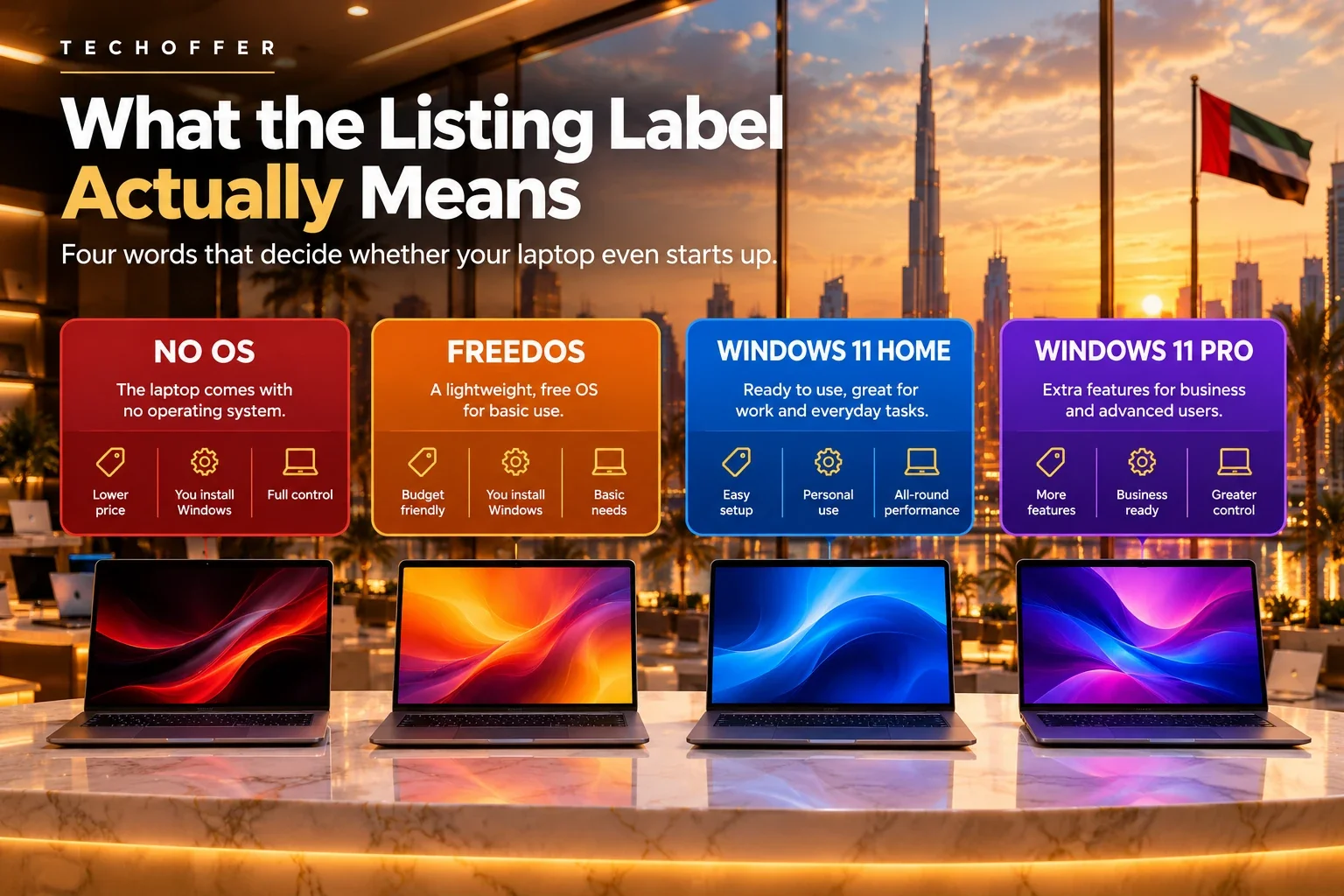
Two things catch people out. A big brand name or a sealed box does not mean there is a Windows licence inside; if the title says No OS, there is not one. And Home and Pro are separate licences, so a Home key will not unlock Pro.
Is a No OS laptop worth it for you?
It is a good fit if:
- You will run Linux (Ubuntu, Fedora or Mint) for coding, study or everyday use.
- You own a retail Windows licence that you are allowed to move.
- Your company installs its own Windows image and licences.
- You have set up a computer from scratch before and have an evening free.
Choose a laptop with Windows 11 instead if:
- You need it ready the day it arrives, for a new job or the start of term.
- Your university runs online exams through a lockdown browser. These tools usually support Windows and macOS, not Linux.
- You depend on Windows-only accounting, engineering or design software.
- You would end up paying someone to install Windows for you.
How much does a No OS laptop really cost?
The price on the page pays for the hardware. What matters is what you will have spent once the laptop can do your job:
Real cost = laptop + Windows licence (if needed) + installation help (if needed)
Here is that sum using laptops listed on TechOffer on 24 October 2026, with the Windows licence we stock (AED 500):
| Laptop | Listed price | OS | Cost once Windows is added |
|---|---|---|---|
| Dell Pro 15 Essential (Core 3 100U, 8GB, 512GB) | AED 1,689 | No OS | AED 2,189 |
| Lenovo IdeaPad Slim 3 15IRH8 (Core i5-13420H, 8GB, 512GB) | AED 1,949 | No OS | AED 2,449 |
| ASUS Vivobook 16 X1607QA (Snapdragon X, 16GB, 1TB) | AED 2,199 | Windows 11 Home | AED 2,199 |
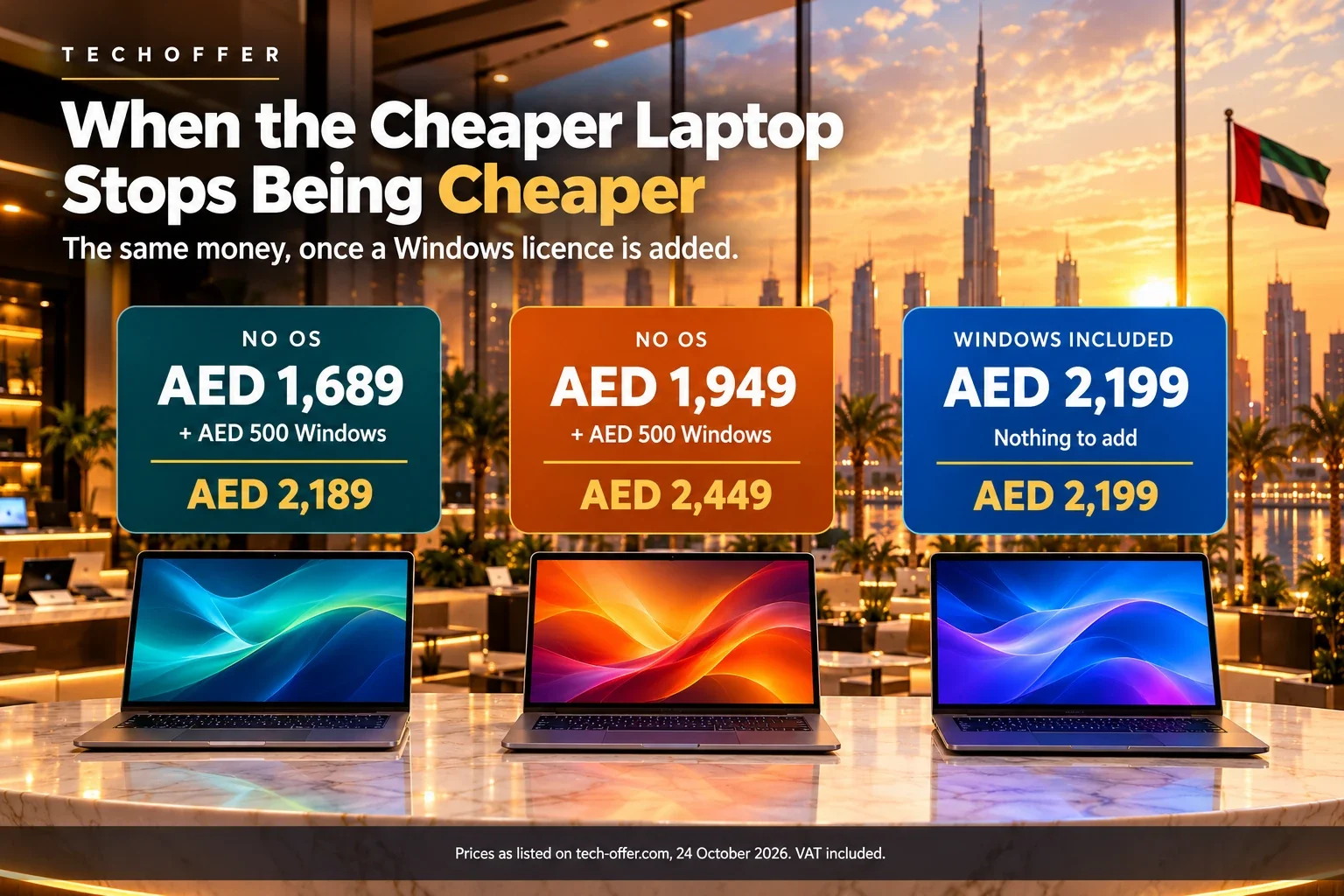
Look at the first and last rows. Once you add a licence, the No OS Dell lands within about AED 10 of an ASUS that already has Windows, double the memory and double the storage. The cheaper laptop stopped being the cheaper laptop.
One thing to check before you choose that ASUS: it uses a Snapdragon (ARM) processor, so make sure your apps support it. Our Copilot+ PC guide shows you how.
Now flip it. If you are installing Linux, or moving a licence you already own, the Dell stays at AED 1,689 and the whole saving is yours. That is the real rule: a No OS laptop pays off when you do not have to buy Windows.
No OS laptops in stock at TechOffer
| Model | Price (24 Oct 2026) | Best for |
|---|---|---|
| Dell Pro 15 Essential — Core 3 100U, 8GB, 512GB, 120Hz screen | AED 1,689 | Office work and Linux on a tight budget |
| ASUS Vivobook Go 15 E1504FA — Ryzen 5, 8GB, 512GB | AED 1,789 | Students and home use |
| Lenovo IdeaPad Slim 3 15IRH8 — Core i5-13420H, 8GB, 512GB | AED 1,949 | Heavier multitasking and coding |
| Acer Aspire Lite AL15 — Core 5 120U, 16GB, 512GB | AED 2,159 | 16GB of RAM without paying for Windows |
Prices and stock move quickly, so check the product page before you order.
What a Windows licence costs in the UAE
You have three ways to get one, and they are not the same price.
| Where it comes from | Typical cost | Worth knowing |
|---|---|---|
| A licence you already own | AED 0 | A retail licence can usually move to a new PC. One that came built into another laptop normally stays with it. |
| Bought with the laptop | AED 500 — our Windows 10 Pro licence | A Windows 10 Pro key activates Windows 11 Pro on hardware that meets the requirements — install Windows 11, not Windows 10. |
| Microsoft direct | About AED 510 for Windows 11 Home at Microsoft list price (US$139) | Home is the cheaper edition and covers everything most people need. |
Be careful with cheap keys. Lifetime Windows keys selling for a few dirhams are everywhere online. Some activate, but that does not make them legitimate, and they can be blocked later. If a key costs a fraction of Microsoft's price, there is a reason.
Install Windows 11, not Windows 10. Windows 10 support ended in October 2025. Microsoft is still sending security updates to enrolled home PCs until 12 October 2027, but that is a safety net for older machines, not a plan for a laptop you are buying today.
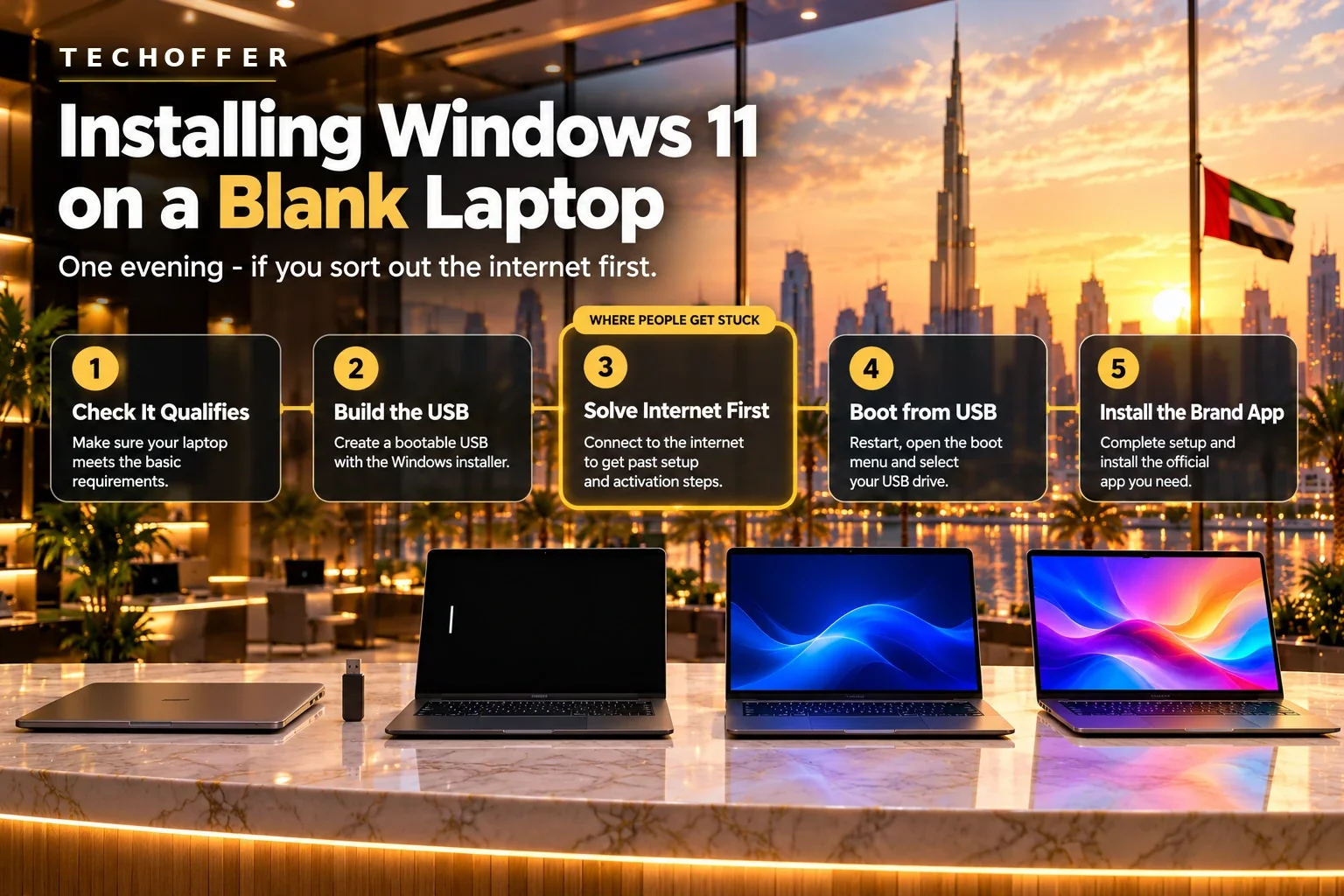
How do you install Windows 11 on a No OS laptop?
The installation itself takes 30 to 60 minutes. Most trouble comes from what happens around it.
- Check the requirements. Windows 11 needs a supported processor, TPM 2.0, Secure Boot, 4GB of RAM and 64GB of storage. New laptops sold today meet them; older stock is worth a quick check on Microsoft's specifications page.
- Create the installer. On another computer, use Microsoft's Media Creation Tool and a USB drive of at least 8GB.
- Sort out internet before you start. This is where most people get stuck. Windows 11 setup asks for an internet connection and a Microsoft account, and the old ways around it have been removed. Some new laptops do not recognise their own Wi-Fi card during setup. Save the Wi-Fi driver for your exact model on the same USB drive, or keep a USB-to-Ethernet adapter or phone hotspot ready.
- Start from the USB drive. Press the boot-menu key while the laptop powers on. It is usually F12 on Dell, Lenovo and Acer, and Esc or F8 on ASUS.
- Install the brand's support app. After Windows Update finishes, the laptop maker's own app fills in touchpad, keyboard-shortcut and battery drivers.
Windows includes Arabic and English keyboard layouts. If your laptop has a bilingual keyboard, add Arabic under Settings > Time & language.
Not keen on doing it yourself? Message us on WhatsApp before ordering, and we will tell you what setup involves for that exact model.
What if you would rather use Linux?
Linux costs nothing, installs in about the same time, and on these machines it runs well. Ubuntu and Linux Mint are the usual starting points, and both detect most hardware without extra drivers.
Three things to check before you commit:
- Your essential apps. Browsers, office suites, code editors and most development tools are fine. Windows-only accounting, engineering and design software is not, and the web versions are rarely a full replacement.
- Wi-Fi and graphics. Search your exact model name alongside the Linux version you plan to install. Someone has usually tried it already.
- Exam and work software. Lockdown browsers and some corporate VPN clients are Windows and macOS only.
If all three check out, a No OS laptop plus Linux is the cheapest genuinely good laptop you can buy in the UAE right now.
Students, businesses and bulk orders
For students, timing beats saving. A laptop that cannot open your course or exam software in week one costs more than any licence. Check your university's software list before you buy. If anything on it is Windows-only, or exams use a lockdown browser, go for a Windows 11 model.
For businesses, No OS makes sense when an IT team already handles Windows images and volume licences, so you are not paying for Windows twice. Without in-house IT, laptops that staff can unbox and use usually work out cheaper overall. Before a bulk order, agree who will install, activate and maintain each machine, then compare the total for the whole order. Our B2B wholesale team quotes both setups for companies across the UAE and the wider GCC.
Five checks before you order
- The exact OS wording in the title: No OS, FreeDOS, Windows 11 Home or Pro.
- Whether your must-have apps run on the system you will install.
- Driver downloads for your exact model on the manufacturer's support site.
- The real cost compared with the nearest Windows 11 laptop.
- Your invoice and any licence proof, kept together for warranty claims.
See No OS and Windows 11 models side by side in our laptop range. For a wider view of value at every budget, read Laptop Prices in the UAE in 2026 and How to Compare Laptop Prices in Dubai. If you are weighing a newer AI machine against a cheap blank one, our AI PC buying guide covers what the extra money actually buys.
Frequently asked questions
Can I use Windows 11 without activating it?
Yes, Windows 11 installs and runs without activation, but it shows a watermark and locks personalisation settings. Microsoft's licence terms still require a valid licence for ongoing use.
Is FreeDOS the same as Windows?
No. FreeDOS is a free, text-based system used mainly for testing hardware. It cannot run Windows programs, so a FreeDOS laptop needs an operating system installed just like a No OS one.
Can I move my old laptop's Windows licence to a new laptop?
A retail licence usually can be moved once you remove it from the old device. A licence that came preinstalled on the old laptop is normally tied to that machine and cannot be transferred.
Does installing my own operating system void the warranty?
No. The manufacturer's hardware warranty still applies. Software problems caused during installation are not covered, so keep your invoice and note how the laptop was supplied.
Is Linux a good choice for a No OS laptop?
Often, yes, for programming, web work, study and everyday browsing, and it costs nothing. Check that your essential apps, Wi-Fi card and graphics are supported before you commit.
How long does it take to set up Windows on a No OS laptop?
Plan on one to two hours in total: about 30 to 60 minutes for installation, then updates, drivers and signing in to your accounts.
Why is a No OS laptop cheaper than the same model with Windows?
The manufacturer does not include a Windows licence or install the software, and that saving is passed on in the price. The hardware is the same.
Can I buy the Windows licence from TechOffer with the laptop?
Yes. We stock a Microsoft Windows 10 Pro 64-bit licence at AED 500, and it appears as an accessory on our No OS laptop pages. A Windows 10 Pro key activates Windows 11 Pro on hardware that meets Windows 11 requirements, so install Windows 11 with it rather than Windows 10. Message us before you order and we will confirm the edition you need for your laptop.
The bottom line
A No OS laptop is not a trap, and it is not an automatic bargain. If you will not be buying Windows, it is one of the easiest ways to get better hardware for your budget. If you will, add the licence and your time to the price, and a laptop with Windows already installed often comes out ahead — sometimes by a margin small enough to make the decision for you.
Have a question?
Send us the model you are looking at and what you will use it for on WhatsApp, and we will tell you exactly what you would need before you order — including whether that model installs Windows 11 cleanly.
How we put this guide together
Laptop prices and stock come from TechOffer product listings checked on 24 October 2026, and every model named here was in stock on that date. The Windows licence price is our own listed price on the same date. Licence pricing, activation rules, Windows 11 system requirements and Windows 10 end-of-support dates come from Microsoft's official documentation. We will update this guide when prices or Microsoft's policies change.
Have a Question?
Have a question about this article or something related to the topic? Feel free to ask. We will do our best to help.